
Product Watch / software review published; hardware not tested / Updated October 9, 2026
Zenframe Family Display Product Watch
Source-backed and software-tested notes on Zenframe Display and Display Mini, two European family screens for calendars, meals, household tasks, kids routines, photos, and AI-assisted planning.
Zenframe is a Norway-based family-management platform with optional 15.6-inch and 10.1-inch displays. The public product pages position both sizes as always-visible screens for family calendars, meals, tasks, kids routines, photos, clock, and weather. SmartFrameLab used a dedicated reviewer web account to check representative AI and calendar-subscription workflows. This remains a Product Watch without a review score because the physical displays, native apps and long-term household use have not yet been tested.
Quick answer
- Zenframe is an early-stage European family-display candidate, with a 15.6-inch main display and a 10.1-inch Display Mini running the same household content.
- Official English product data checked September 12, 2026 listed €329 for Display and €229 for Mini, one Family year included, and an in-stock indication. The October follow-up did not recheck prices or stock; confirm shipping, tax and availability at checkout.
- The strongest reason to keep watching is the combined calendar, meals, tasks, kids-routine, photo, and AI-assisted planning system. Reviewer-account checks support the core web workflow, while hardware experience, native-app behavior and longer-term synchronization still need separate testing.
European family-display research path
Check sync, household workflows, and plan boundaries.
Zenframe combines calendars, meals, tasks, kids routines, photos, and AI-assisted planning. SmartFrameLab has tested representative AI and public-ICS workflows in a reviewer web account; hardware testing remains pending.
Calendar and command-center fit
- Zenframe Display ReviewRead the hands-on software findings, evidence limits, and current buying guidance.
- Calendar Sync SupportSeparate native sync, imports, ICS feeds, and two-way calendar behavior.
- Family Command Center vs Calendar FrameDecide whether the household needs a shared planning system or a simpler calendar screen.
Household workflow checks
- Chores, Routines, and Shared TasksCompare household ownership, child routines, rewards, and shared task visibility.
- AI Assistant ReadinessJudge AI tools by confirmed household outcomes, controls, and correction paths.
Plan and category boundaries
- Free vs Paid Feature BoundariesCompare the free Basis tier with the Family subscription after the included year.
- What Is a Smart Calendar Frame?Place Zenframe within the wider calendar-first family display category.
Product media
Display visual evidence
6 official media assets Used for feature context, not scoring weight.
Series map
Zenframe products in this watch list
2 models tracked Candidate paths are kept distinct from scored reviews and Best Picks.
Zenframe Display
Zenframe Display
- Role
- Main kitchen or household planning surface
- Screen
- 15.6-inch touchscreen
- Status
- Listed in stock at the September 12, 2026 check; confirm current availability
- Price signal
- €329 on the official English product data; regional prices vary
Zenframe Display
Zenframe Display Mini
- Role
- Smaller hallway, child-room, or secondary display
- Screen
- 10.1-inch touchscreen
- Status
- Listed in stock at the September 12, 2026 check; confirm current availability
- Price signal
- €229 on the official English product data; regional prices vary
Source-backed watch notes
What we verified
Reviewer web checks remain dated September 13, 2026. Zenframe’s September 26 follow-up reviewed October 9 adds reported fixes and mobile calendar-export details; these changes have not been independently retested. Physical displays remain untested. Checked October 9, 2026
What Zenframe is
Zenframe combines a family-management service with optional always-visible displays. Its category fit is closer to a family command center than a photo-only frame because calendars, meals, household responsibilities, child routines, and planning tools share the same system.
- The 15.6-inch model is positioned as the main family surface; the 10.1-inch Mini is positioned for smaller spaces.
- Both models are described as showing the same Zenframe content rather than offering different software tiers.
- SmartFrameLab is tracking the pair as one product family until testing shows a meaningful workflow difference beyond screen size and hardware capacity.
Calendar and family workflow checks
Zenframe clarified its calendar connections in writing on September 12, 2026. Google Calendar uses an account-level OAuth connection with read-only scopes. Apple/iCloud and Outlook use calendar subscriptions rather than native account integrations. SmartFrameLab then connected two independent public ICS feeds in the reviewer account, confirmed that their events appeared, ran a manual sync and removed both test subscriptions. The stated automatic refresh interval still needs a timed test.
- The September 13 web test covered one-way calendar subscriptions. On September 26, Zenframe announced a mobile-app option to copy its own events to an existing iCloud, Google or Outlook calendar on the phone. We have not tested that export.
- Apple/iCloud import requires a public ICS calendar link; Zenframe says the read-only subscription refreshes about every 30 minutes. There is no native CalDAV connection. Outlook support is also via calendar subscription. The two public ICS tests support the general subscription path, while provider-specific setup still needs separate checks.
- Imported event title and time were read-only in the tested view, while a local household annotation could be added. Removing the test subscriptions cleared their calendars after a short interface refresh delay.
- An outbound secret, revocable ICS feed lets other apps subscribe to the family calendar. Separately, the reported mobile export writes only Zenframe-created events; external imports are not written back. Edits made in the target calendar do not flow into Zenframe and may be overwritten, so this is not full two-way event editing.
- Zenframe says Google and public-calendar imports refresh every 30 minutes and support recurring events. Changed or cancelled individual occurrences depend on how the source calendar provides them. We have not verified the timing or these cases.
- The reported mobile export can include all family events or only the user’s events plus unassigned shared events. Zenframe says deleting its event removes the exported copy and markers prevent changes to unrelated calendar entries. These safeguards remain manufacturer claims.
The subscription boundary
Zenframe gives buyers a useful post-inclusion fallback: the official FAQ says the display retains calendar, photos, clock, and weather through the free Basis tier after the included first year. The buying decision is therefore whether meals, kids tools, tasks, assistant functions, and events justify restarting Family.
- Nothing should renew automatically after the included year according to the current official FAQ.
- The full Family tier is currently stated as 149 NOK per month, with no annual plan identified in the manufacturer brief.
- Check which features your chosen plan includes and confirm the price for your country before buying.
What the supplied media shows
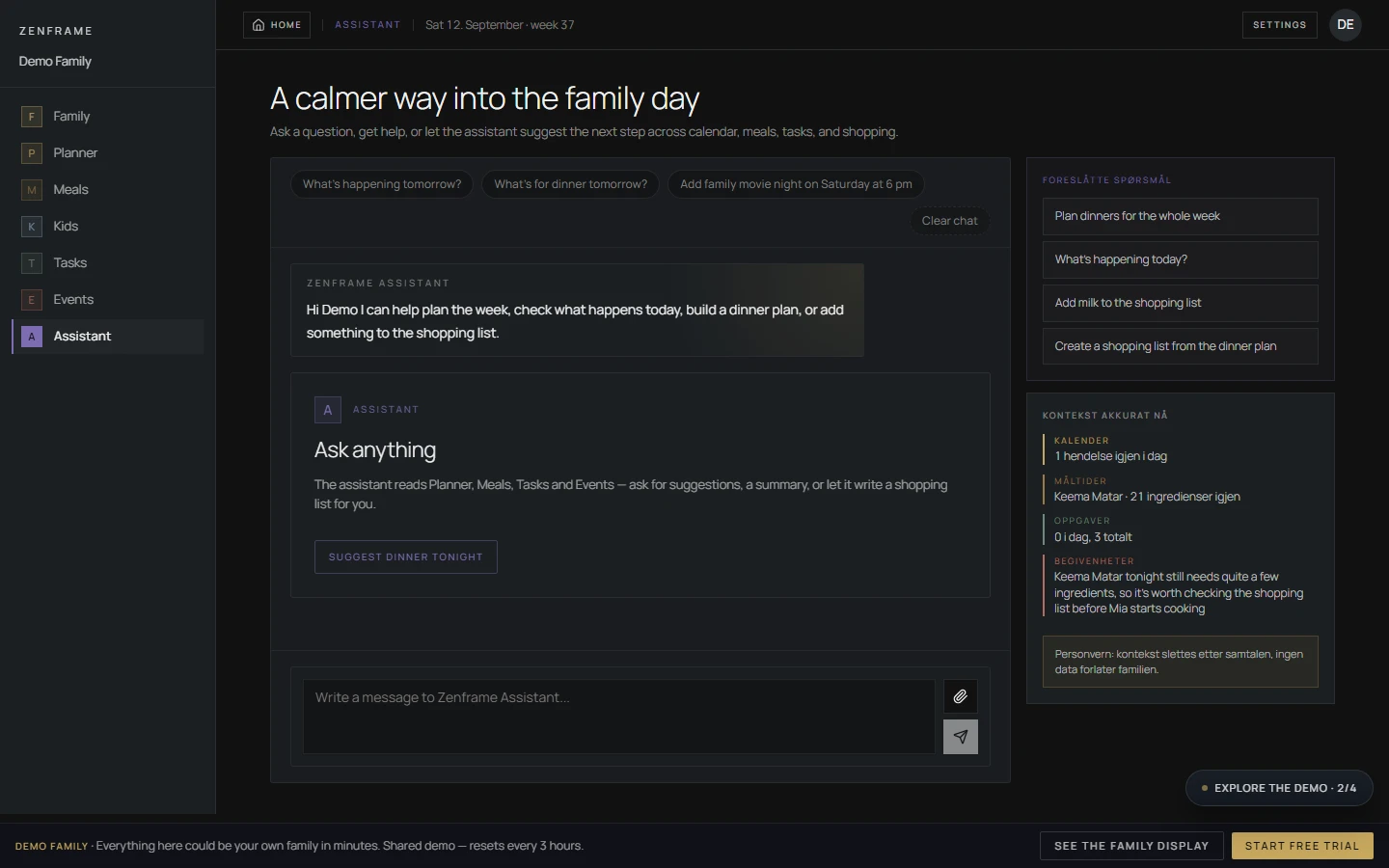
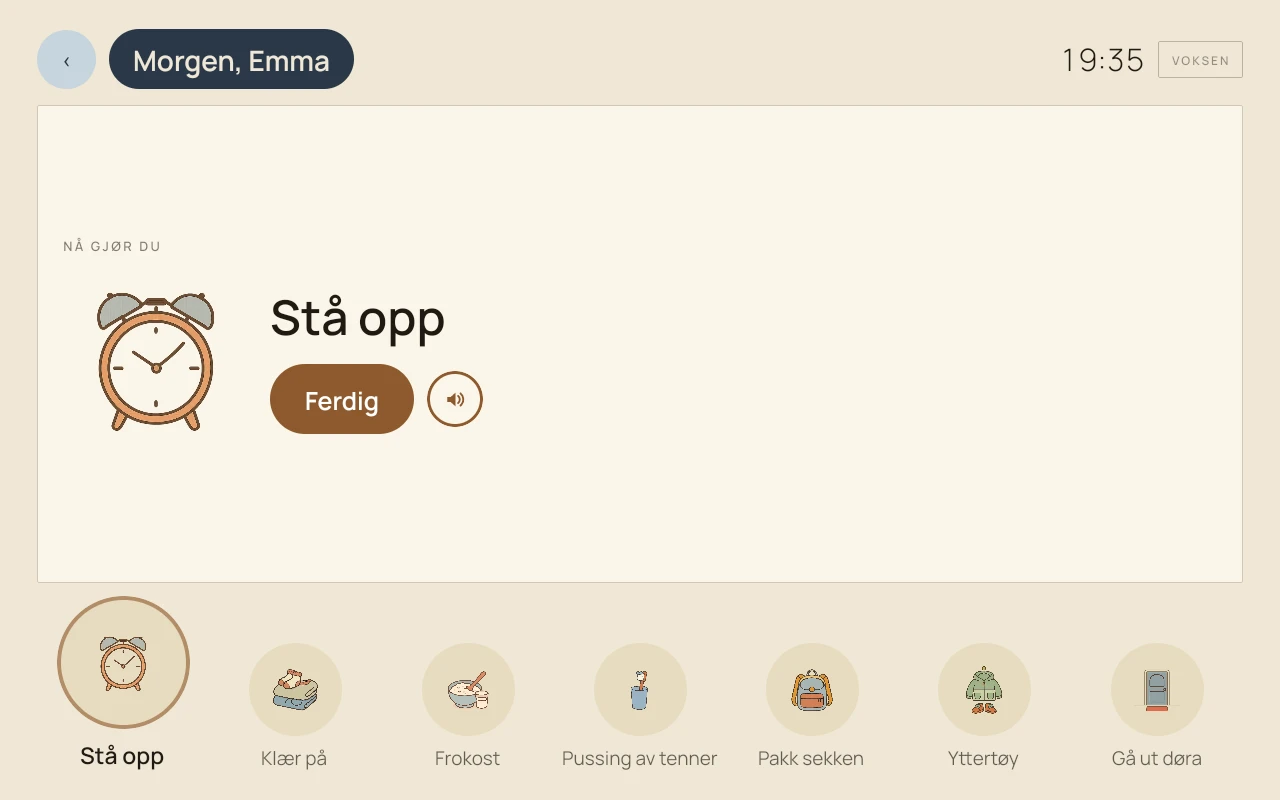
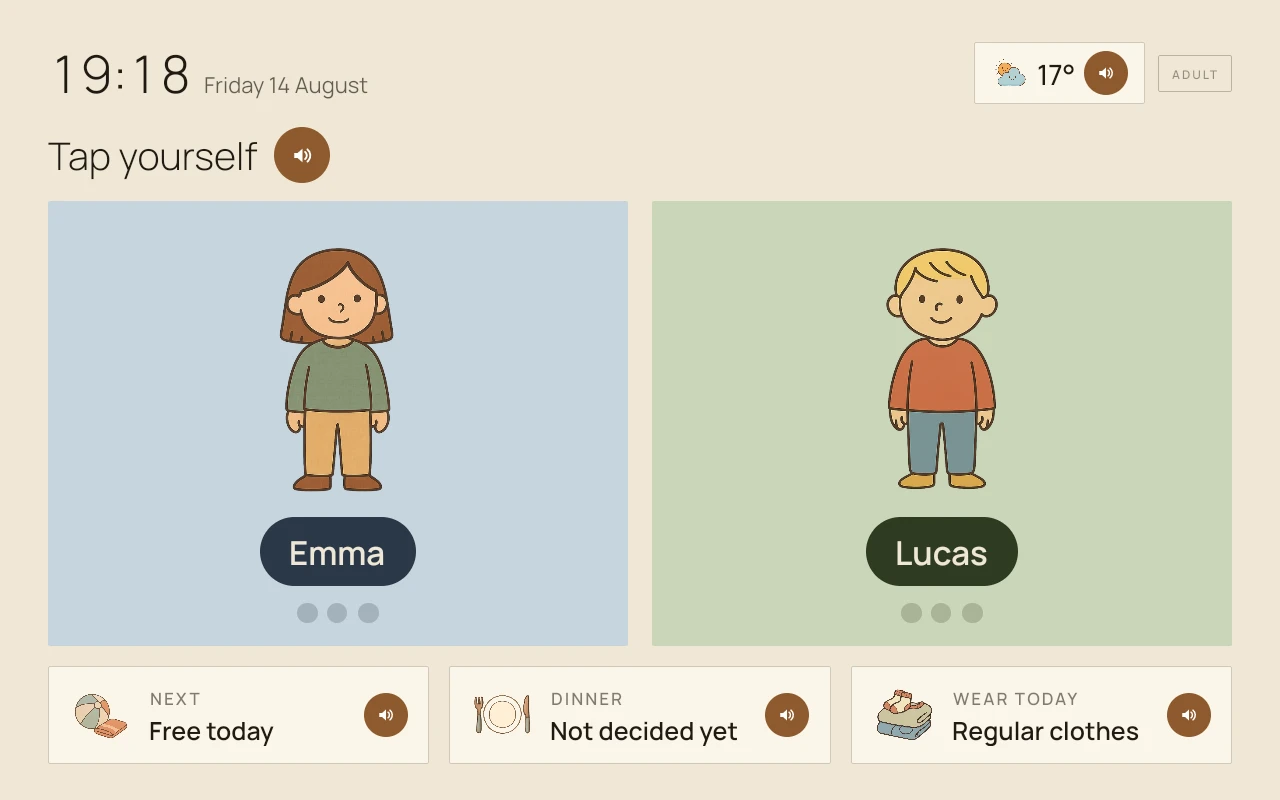
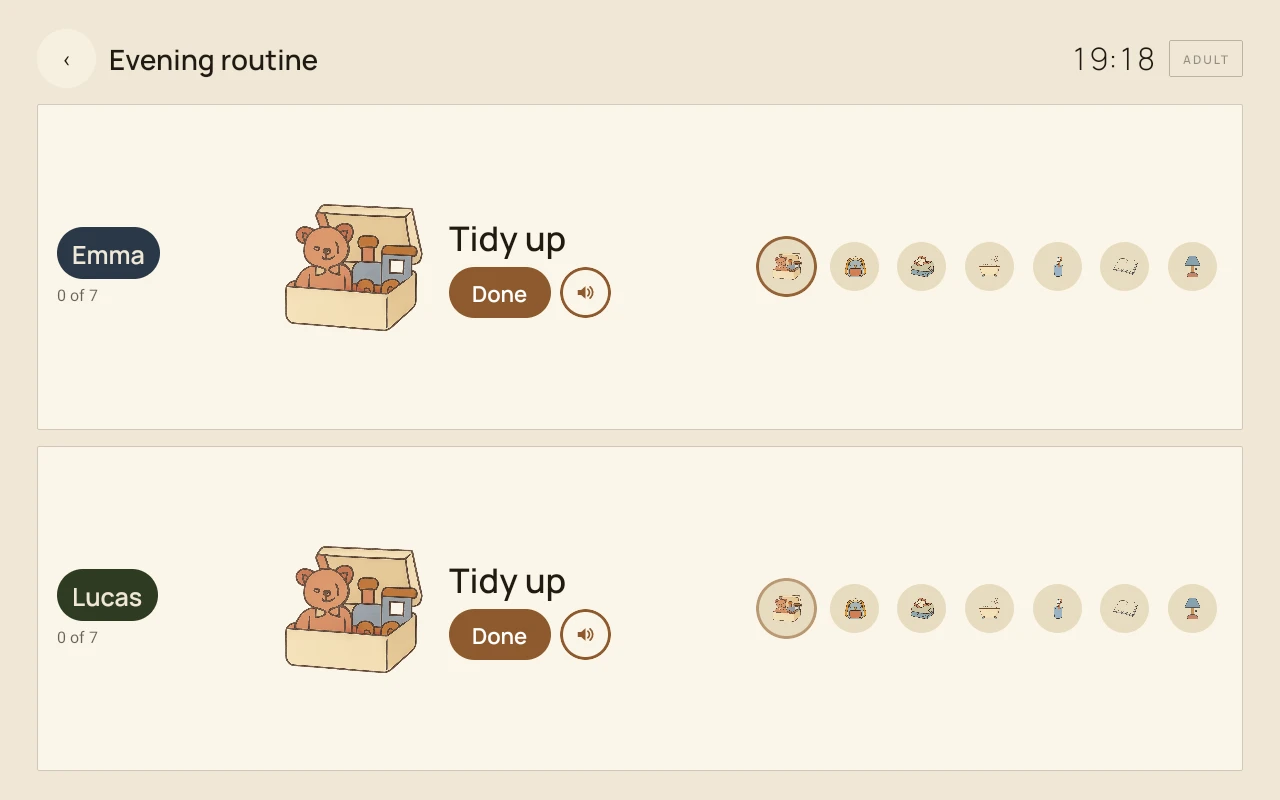
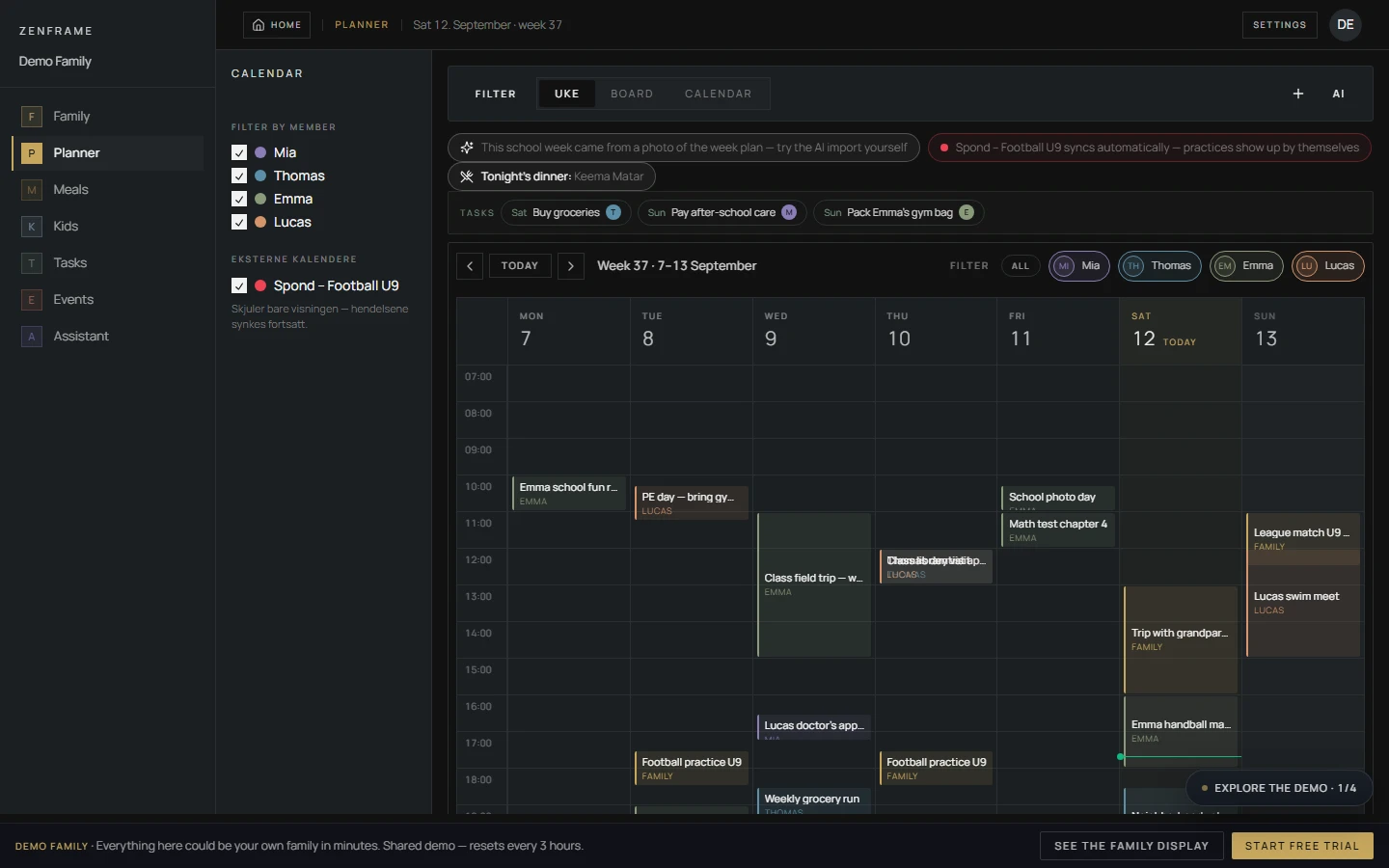
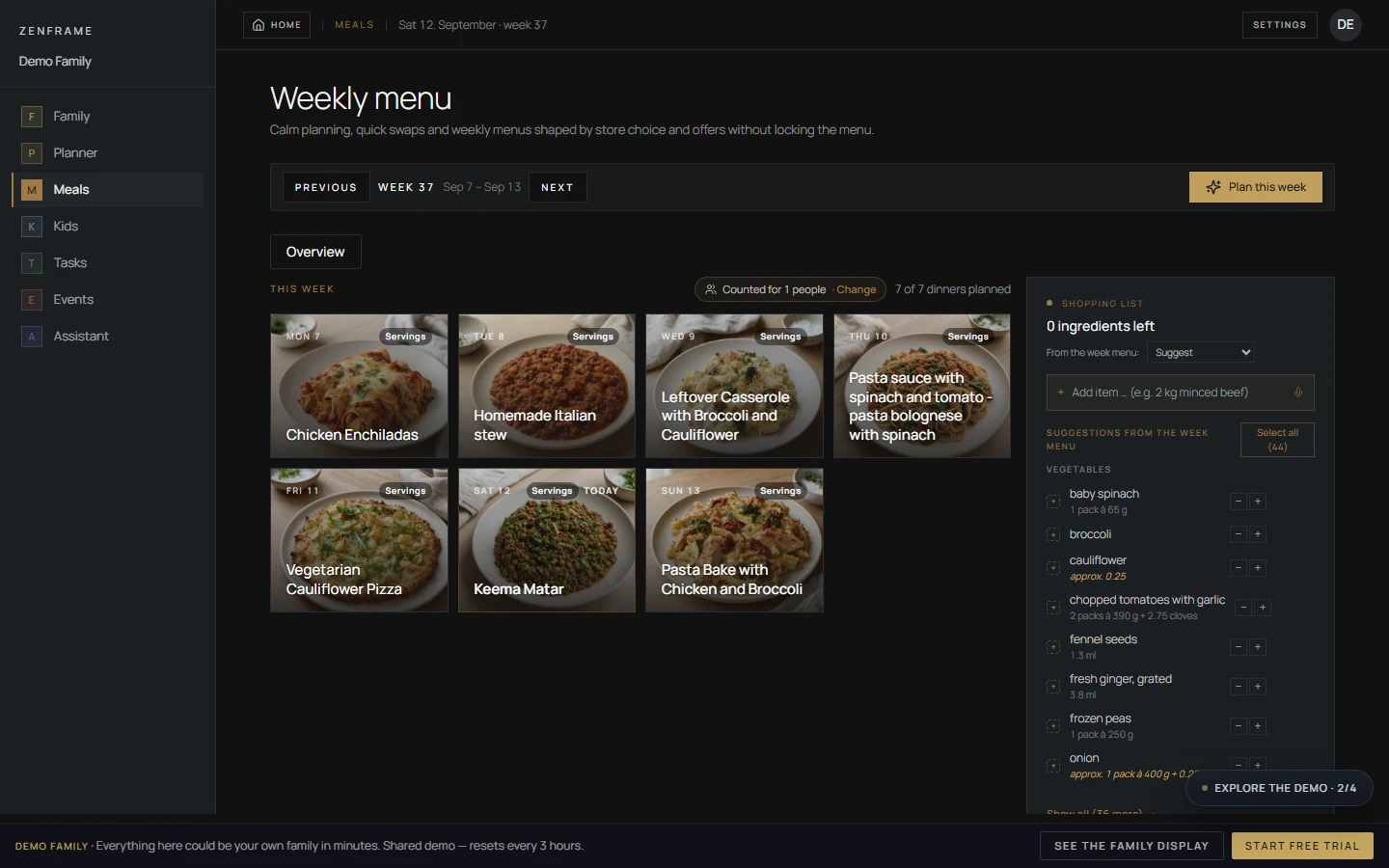
The selected media shows a wall-mounted display, the AI assistant, a step-by-step morning routine, Kids interfaces and the web calendar and meal planner. Zenframe identifies the panel images as captures from real displays and the web images as demo-family screenshots. The hallway photograph has supplier edits and blurred names. These materials add useful product context, while touch response, screen quality, speaker quality, mounting and everyday reliability need physical testing.
- Photo and screenshot captions identify the supplier and the type of evidence. The web screenshots retain the demo badge; some labels remain in Norwegian.
- The supplied panel screenshots show August dates; they illustrate the supplied interface version rather than a verified September software build.
- The supplied images do not establish the Mini’s stand stability, mounting access or screen quality in everyday use.
AI assistance across the family plan
AI-assisted household planning is a central part of Zenframe’s offer. The supplied assistant screenshot shows suggested questions about upcoming events and dinners, shopping-list prompts, a file-attachment control and a sidebar presenting family context. In the reviewer account, SmartFrameLab checked a contextual question, an approval-gated shopping-list action and a synthetic school-notice image.
- The assistant returned a useful answer based on the visible calendar, tasks and meals in the seeded reviewer family. This was a focused scenario rather than a broad accuracy benchmark.
- A request to add two liters of milk produced an approval step before the shopping-list tool ran. After approval, the item persisted with its quantity and unit; the temporary test item was then removed.
- After the test account language was corrected, the interface and a typed Assistant response appeared in English. A school-notice image produced the expected date, child assignment and bring-along note; this does not establish accuracy for every document.
- The September 13 retest stored the English notice title and note in Norwegian and wrote the import without a separate approval card. In its September 26 response, Zenframe reports that all import paths now use the family language and shared files show a proposal card before approval. SmartFrameLab has not repeated these checks to verify the fixes.
- The original 10:00 Assistant / 16:00 calendar difference was timezone conversion, Zenframe confirmed. It reports using the browser zone when no family location is chosen, while a selected location takes precedence. Some AI “today” calculations still assume Central European time, according to the same response.
- The morning-routine image shows a separate child-facing step interface. It does not demonstrate that AI generated the routine.
What the reviewer account established
In a September 13, 2026 browser session, SmartFrameLab completed onboarding in a dedicated reviewer account and explored the calendar, meals, tasks, kids, events and assistant modules. The account supplied enough connected family context to test read-only questions, approval behavior and calendar subscriptions without presenting the result as a physical-display review.
- The AI answer matched the seeded plan visible during the test, and the shopping item remained saved after explicit approval.
- HTTPS and webcal public ICS feeds connected successfully, appeared as external sources and displayed all-day events. A manual sync reported updates; the test did not wait long enough to measure the claimed automatic refresh interval.
- The Google OAuth launch requested read-only calendar event and calendar-list scopes. Calendar selection and import remain untested because no separate Google test account was granted.
Reported privacy-label corrections need an independent check
On September 13, 2026, the App Store listing displayed Data Not Collected. Zenframe subsequently reported that Google Play’s Data safety declaration was corrected on September 12 and that the App Store privacy label had also been updated by its September 26 reply. SmartFrameLab has not independently confirmed that both current labels match the detailed processing description.
- Zenframe names external AI and speech providers, including Anthropic, ElevenLabs, OpenAI and Deepgram. Its no-advertising and no-model-training statements remain manufacturer claims, not an independent data-flow audit.
- The September 26 response lists name, email, photos, voice recordings, calendar events and crash logs among the Google Play disclosure corrections. Read the current store labels and privacy policy together; this correspondence is not an independent data-flow audit.
- The reviewer settings exposed controls for logs, proactive AI, family memory and per-member sharing. The interface also says medical-category notes are never shared automatically with AI. These controls add useful context but do not establish store-label accuracy.
What the current evidence cannot answer
The reviewer account supports an evidence-based software review, but broader calendar connections, app and display coverage are still needed for questions about reliability and hardware quality. Google OAuth completion, timed subscription refresh, recurring-event handling, task and routine delivery, native-app behavior and real display hardware remain outside the current verdict.
- Full Google, Apple/iCloud and Outlook setup remains untested; successful public-calendar subscriptions do not establish every provider connection.
- The reported language and import-approval fixes and mobile-export safeguards remain unverified. We have not tested mobile-to-display updates, routine rewards, voice or physical hardware.
- We have not independently confirmed that current app-store privacy disclosures match the data processing Zenframe describes.