
Hands-on software review · hardware not tested · Updated September 13, 2026
Zenframe Display Review: Hands-On Software Test
Zenframe is a promising Norway-based family display with a notably connected software idea. Our reviewer-account checks found useful calendar-subscription and approval-based AI workflows; the physical Display and Display Mini still need separate hands-on testing before we assign a SmartFrame Score.
Quick answer
- Best fit: European families who want calendars, meals, tasks, kids routines, shopping, photos, and an AI assistant in one connected household workspace.
- Skip if: Buyers who need two-way external calendar editing, a fully tested native-app and voice workflow, or independent conclusions about screen, audio, mounting, and long-term hardware reliability today.
- Main buying check: Compare calendar support, subscription boundaries, setup style, and current store availability before purchase.
Still choosing a display? Compare family digital calendars by workflow, paid features and buying limits to see where this option fits alongside other approaches.
Before you buy
Answers to the questions buyers ask first.
Is this a full hands-on Zenframe hardware review?
It is a hands-on review of representative Zenframe web software workflows, supported by official product information and supplier-cleared media. SmartFrameLab has not handled the 15.6-inch Display or 10.1-inch Display Mini, so this page does not score screen, touch, audio, mounting, or long-term device reliability.
What did SmartFrameLab test in Zenframe?
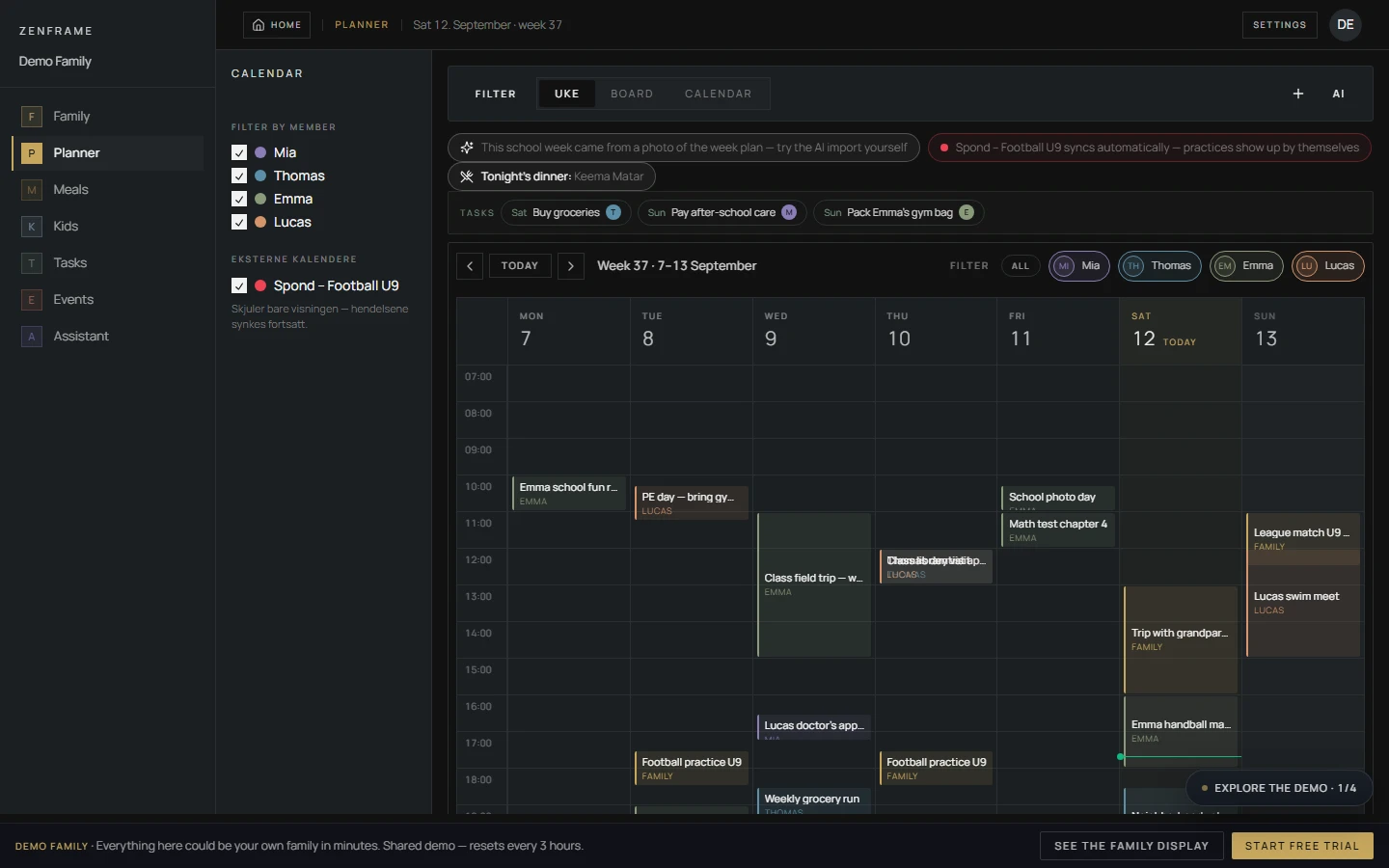
We completed reviewer-account onboarding, explored the calendar, meals, tasks, kids, events, and Assistant areas, checked a contextual AI answer, approved a shopping-list action that persisted with its quantity, imported a synthetic school notice, and connected HTTPS and webcal public calendars with all-day events. Temporary shopping, event, and subscription data was removed after testing.
How does Zenframe connect Google, Apple, and Outlook calendars?
We tested two public calendar subscriptions on September 13. Google requested read-only access, but we did not complete its connection; Apple/iCloud and Outlook setup also remain untested. On September 26, Zenframe announced that its mobile app could copy Zenframe-created events to an existing iCloud, Google or Outlook calendar on the phone. Imported events are not sent back to their source. Edits to exported events in the other calendar do not return to Zenframe and may be overwritten by its next sync. This is not full two-way editing, and we have not tested the mobile export.
Is the Zenframe AI assistant useful?
In our September 13 tests, the assistant answered from visible family context, waited for approval before adding two liters of milk, and extracted a dated event, child assignment, and note from a synthetic school notice. The notice import then wrote directly and stored its English title and description in Norwegian. Zenframe’s September 26 follow-up reports fixes for both imported-content language and file-import approval. Those reports update the status of the issues, but SmartFrameLab has not yet repeated the tests to verify the fixes.
What happens after the included Zenframe Family year?
Zenframe says the free Basis tier keeps calendar, photos, clock, and weather after the included year. The fuller Family feature set can be restarted at the stated monthly price and does not begin renewing automatically according to the current official FAQ. Recheck current regional terms before buying.
Can this review support a buying decision today?
Yes, when your main question is whether Zenframe’s calendar, AI, meal, task, shopping, and routine software matches your household. Wait for broader evidence if screen quality, touch response, audio, mounting, native-app delivery, automatic calendar refresh, or long-term reliability will decide the purchase. We have not assigned a SmartFrame Score or ranking from the software evidence alone.
Research path
Where Zenframe fits next.
Move from this review into the comparison, best-pick, and guide pages that clarify the buying decision.
Product watch
- Zenframe Family Display Product WatchSource-backed and software-tested notes on Zenframe Display and Display Mini, two European family screens for calendars, meals, household tasks, kids routines, photos, and AI-assisted planning.
Buying guides
- Family Command Center or Calendar Frame?Choose a shared home screen by the problem it must solve: visible schedules, task ownership, family photos, or a configurable information wall.
- Smart Frame Subscription Costs ExplainedHow to compare free features, paid plans, AI extras, and ongoing household value before choosing a smart frame.
- Google Calendar Dashboard Wall Display GuideBuild the screen view first: compare Google Calendar dashboard templates and real home examples, then choose wall-display hardware.
- Apple Calendar Family Display GuideHow Apple and iCloud Calendar households should evaluate smart wall displays, shared calendars, setup paths, event colors, and family workflow fit.
Product media
Product and series references
6 images Used for visual model context, not ranking weight.
Buying path
How to use this review before clicking through
How we tested the software
SmartFrameLab used a dedicated reviewer web account on September 13, 2026. We completed onboarding without inviting outside participants and worked with seeded family data across the main planning modules. This is enough for a focused software review, while physical display and long-term household conclusions remain open.
- Tested the web calendar, meals, tasks, kids, events, shopping, settings, and Assistant areas.
- Used temporary actions and subscriptions, then removed the added test data.
- Separated hands-on observations from manufacturer specifications and supplier screenshots throughout the review.
Calendar subscriptions worked in the tested path
We validated public calendar feeds before connecting institutional ICS sources in Zenframe. Follow-up checks used both HTTPS and webcal formats; both appeared as external calendar sources, and all-day holiday events were visible in the month view. This supports the general calendar subscription workflow without turning one session into a long-term reliability claim.
- Imported event title and time were read-only in the tested view, and the tested holiday entries retained their all-day status; a local household annotation could still be added.
- Manual sync completed and reported 70 updated events; that number describes the tested sync window, not the full size of either remote feed.
- Removing both subscriptions cleared their sources and events after a short interface refresh delay.
- Google requested read-only access to events and calendar lists. We did not complete authorization, so Google calendar import itself remains untested.
- The stated approximately 30-minute automatic refresh, revoked-feed recovery, recurring-event edge cases, and provider-specific Apple or Outlook setup still need controlled tests.
The AI assistant showed useful family context and control
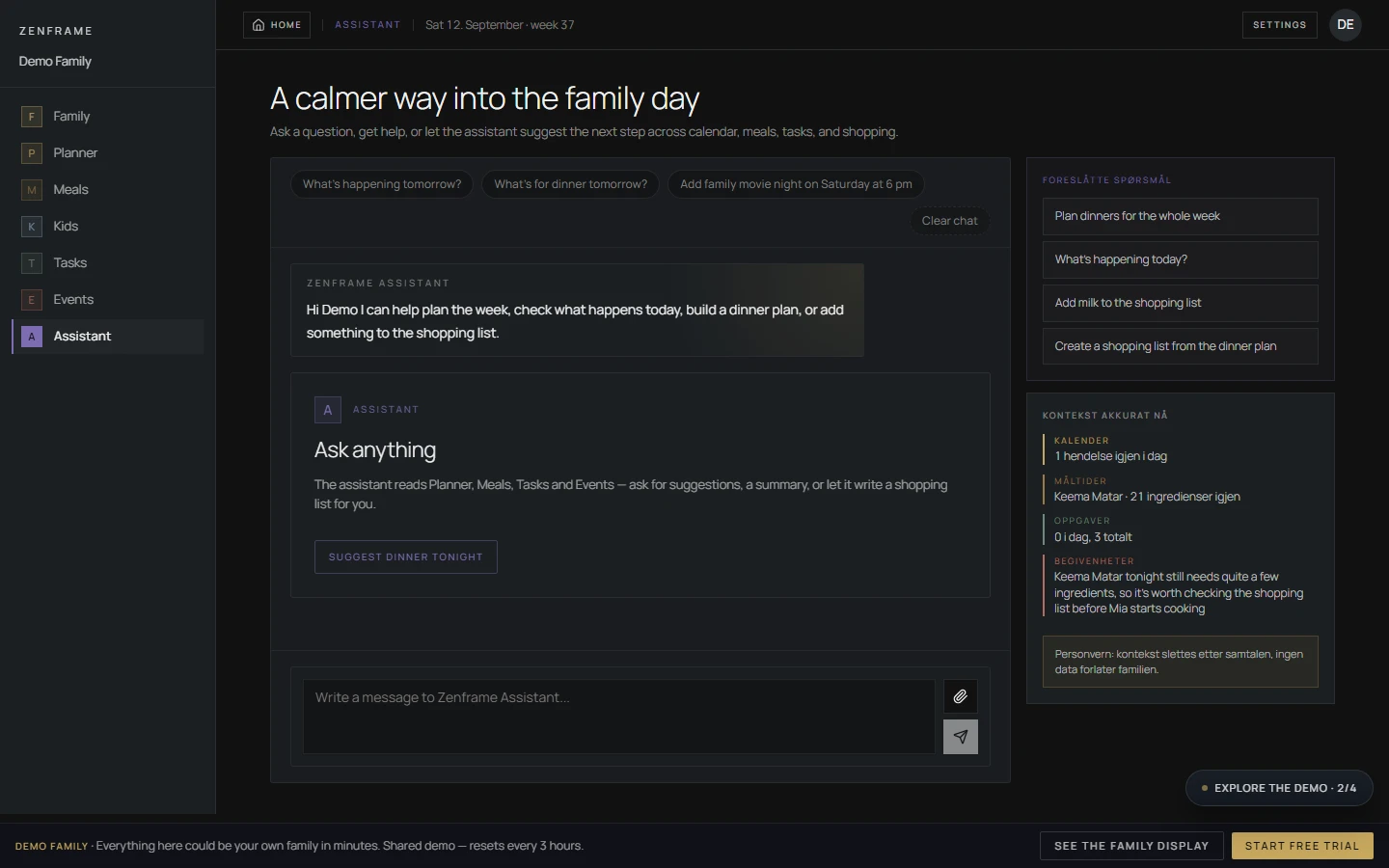
The assistant is one of Zenframe’s more distinctive ideas because it sits alongside the same calendar, meal, task, and shopping context used by the family. Our focused checks showed both a useful read path and an approval-gated write path.
- A contextual question produced an answer consistent with the seeded plan visible during the test.
- The shopping request waited for explicit approval before the underlying action ran.
- The saved result retained the requested quantity even though the approval card emphasized the item name more clearly.
- The upload control lists images, PDF files and Word documents. After the test account language was corrected, the interface and a typed Assistant response appeared in English. A test school-notice image produced the correct date, child assignment and bring-along note; we did not test every supported file type.
- The September 13 test saved an English notice title and note in Norwegian. Zenframe says imported content now uses the family language, whether sent by email, shared from another app or attached in the Assistant. We have not independently verified this fix.
- The September 13 school-notice import wrote directly. Zenframe’s September 26 response says shared files now show a proposal card and wait for approval before saving; confirmation and cancellation still need a fresh hands-on check.
- The assistant showed 10:00 while the calendar rendered 16:00 during the original test. Zenframe confirmed timezone conversion and reports a browser-zone fallback when no family location is set, with a chosen location taking precedence. It also acknowledged that some AI calculations of “today” still assume Central European time.
Family workflows extend beyond the calendar
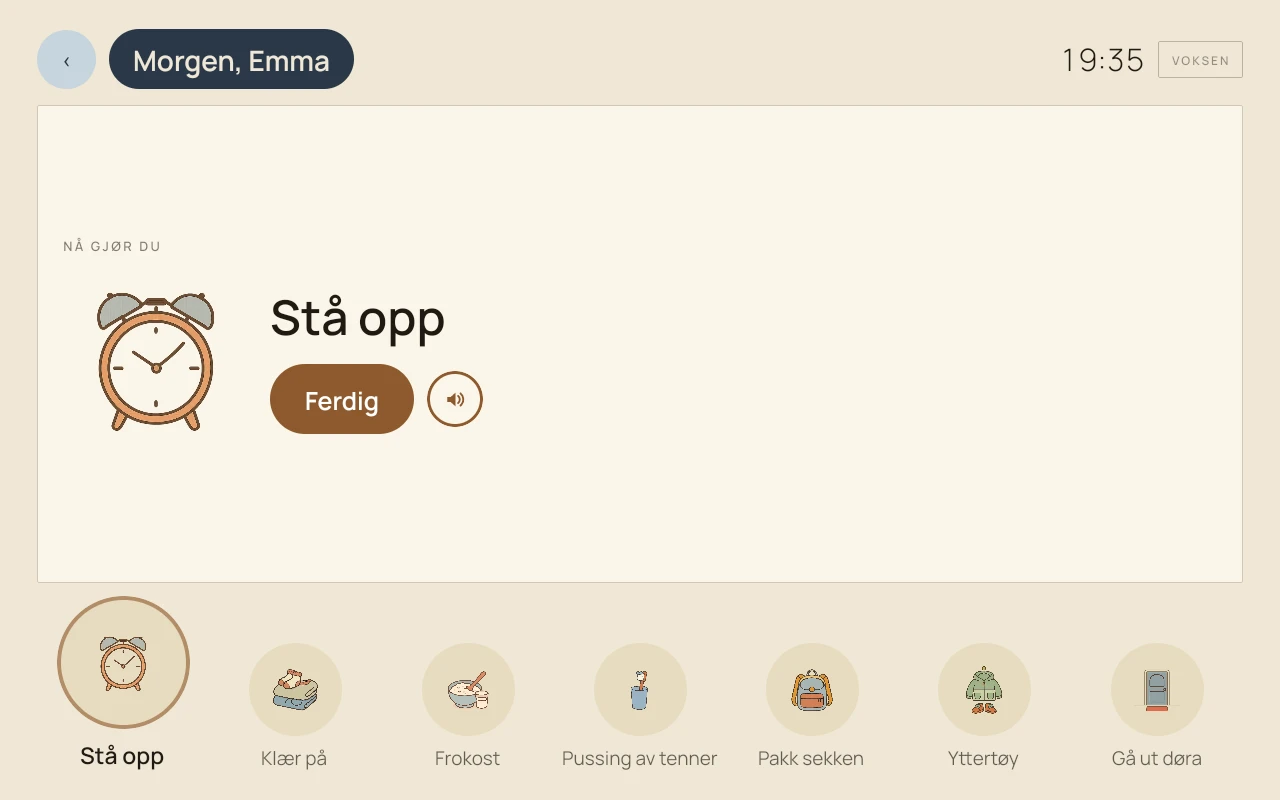
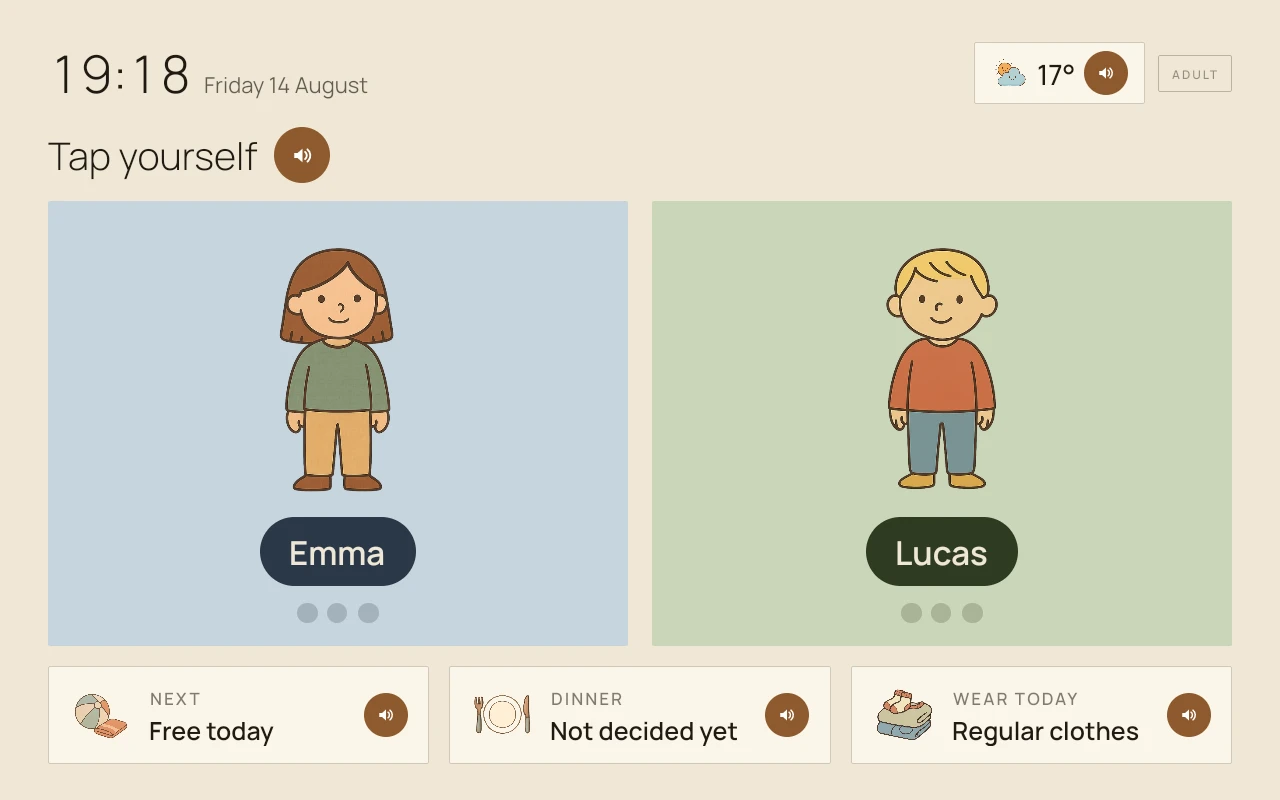
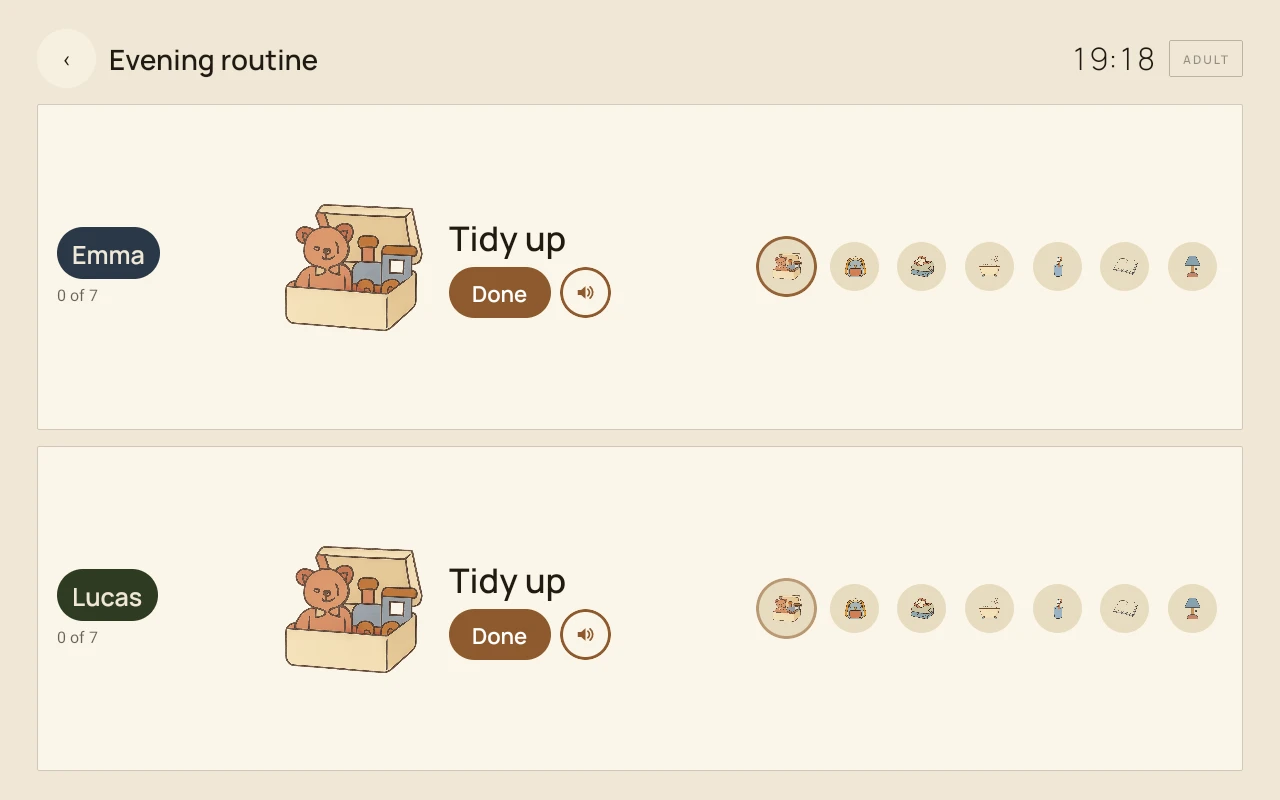
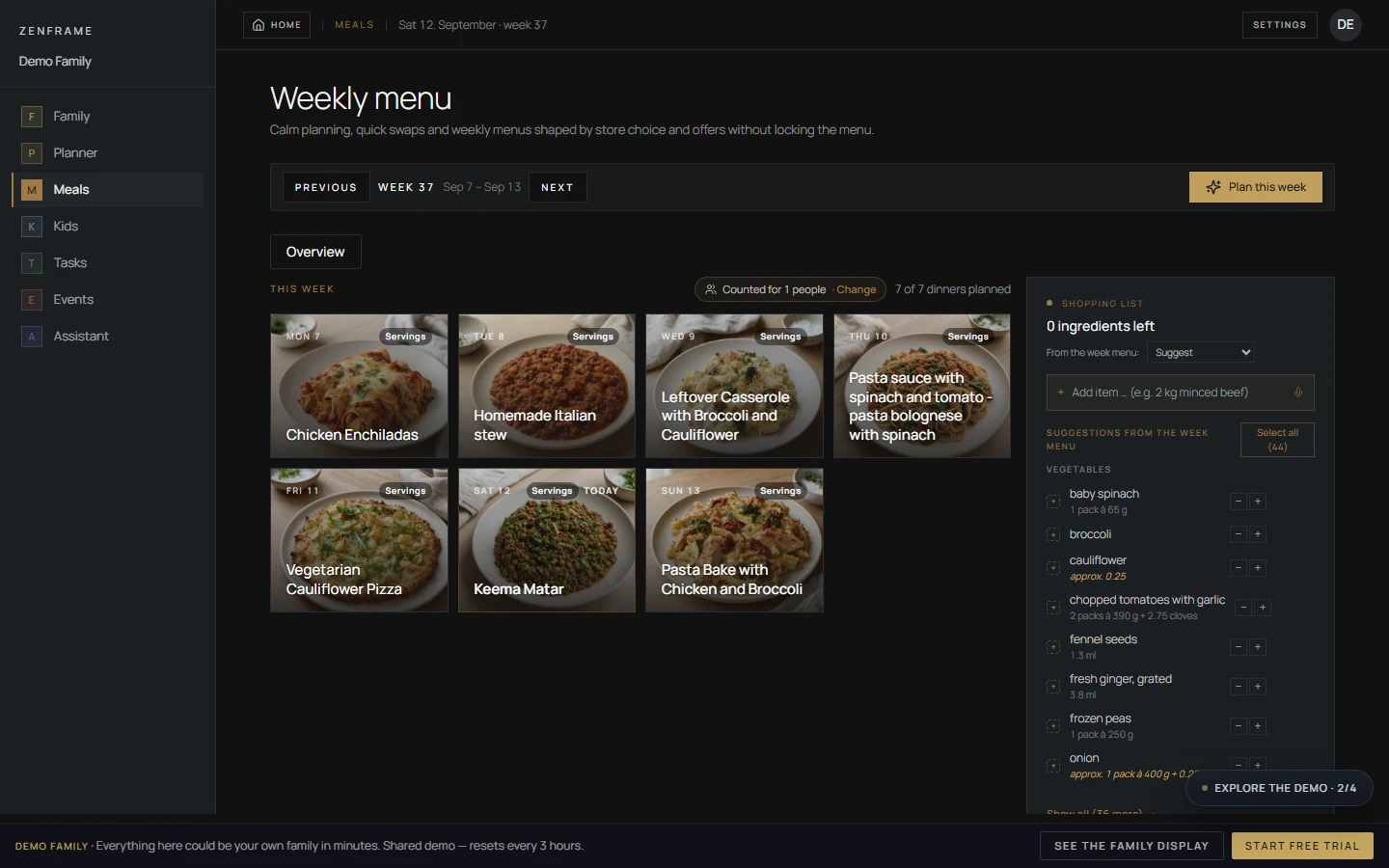
Zenframe brings meals, shopping, shared tasks, kids profiles, routines, photos, weather, and planning into one workspace. The supplied screenshots make that breadth visible, and reviewer access confirmed the corresponding web modules were present.
- The AI and meal-planning screens show how planning context can stay close to the family calendar.
- Morning and evening routine screenshots show a child-facing step interface on Display Mini.
- Routine rewards, read-aloud behavior, native notifications, and mobile-to-display propagation still need direct testing.
Privacy controls and the reported store-label updates
The reviewer settings exposed controls for logs, proactive AI, family memory, and member sharing. Zenframe’s September 26 response says Google Play’s Data safety declaration was corrected on September 12 and the App Store privacy label was also updated. SmartFrameLab has not independently confirmed that the current labels fully match the described processing; read both store disclosures alongside the privacy policy.
- Current manufacturer statements say family data is not used for advertising or model training; SmartFrameLab has not performed an independent data-flow audit.
- Family memory and per-member AI-sharing controls are useful settings for households to review during setup. The interface also says notes categorized as medical are never shared automatically with AI.
- The reported label corrections are manufacturer statements, not an independent audit of collection, sharing, retention, or provider practices.
What Zenframe clarified after our software test
In a September 26, 2026 follow-up, Zenframe addressed the issues observed in our September 13 software session and announced a mobile calendar-export change. The following account separates those manufacturer statements from the workflows SmartFrameLab actually tested.
- Zenframe says Google Calendar and public calendar subscriptions refresh every 30 minutes and support recurring events. Support for changed or cancelled individual occurrences depends on the calendar source. We have not measured the refresh interval or tested those recurrence cases.
- The announced mobile export lets a family select an existing iCloud, Google, or Exchange/Outlook calendar on the phone and choose all family events or only their own plus unassigned shared events. Only Zenframe-created events are exported; deleting them in Zenframe also removes the exported entries according to the manufacturer.
- Zenframe says exported entries are marked so it only updates its own events. External-calendar edits to these entries do not flow back and may be overwritten; imported Google, ICS, and phone-calendar events are never written back to their source.
- Physical Display and Display Mini hardware, native-app propagation, and long-term reliability remain outside our hands-on evidence.
What this review can tell you now
The software evidence is useful for deciding whether Zenframe’s connected family workspace fits the way your household plans. Zenframe positions the 15.6-inch Display as the main household surface and the 10.1-inch Display Mini as a smaller-room or child-facing companion, but supplier-cleared photos and screenshots cannot answer the hardware questions that matter after the software fit is established.
- Check the exact model, frame variant, live checkout total, shipping, tax, stock, and return terms for the buyer’s country.
- Wait for physical testing when viewing angles, brightness, touch response, speaker and microphone quality, stand stability, mounting, or recovery behavior are decisive.
- Use this review now when calendar, AI, task, meal, and routine software fit is the main question.
Source-backed notes
Sources and testing notes
Official sources + hands-on software checks Source baseline: September 13, 2026
SmartFrameLab combined official pages, a detailed manufacturer response, supplier-cleared media, public store disclosures, a dedicated reviewer account, controlled public-ICS checks, and a synthetic school-notice image. The evidence supports a hands-on software review and clear buying guidance, while the physical displays, native apps, voice, automatic refresh timing, recurring-event handling, and long-term household use remain unscored.
- This review includes Zenframe’s September 26 explanation of language, import approval, timezone handling, privacy labels and calendar export. We reviewed that response on October 9; our hands-on software observations remain dated September 13.
- Reviewer-account testing covered representative web workflows and did not include a physical Zenframe Display or Display Mini.
- Public HTTPS and webcal feeds connected and displayed all-day events; automatic refresh timing was not measured.
- The AI assistant answered from visible family context and required approval before the tested shopping-list write.
- In the September 13 test, a supported synthetic school-notice image produced a calendar item with the correct date, child, and note, but wrote without the separate approval card observed in the shopping test. Zenframe reported an import-approval fix on September 26; it has not been independently retested.
- In the September 13 test, the school-notice time appeared as 10:00 in the assistant and 16:00 in the calendar under a different timezone context. Zenframe later explained the conversion and reported a browser/family-location correction, but some AI today calculations still used CET; the full workflow remains unverified.
- Different timezone settings can move an event to another calendar date. Check the family location and event time before relying on an imported notice.
- Supplier media is cleared for SmartFrameLab editorial use. Captions distinguish supplied photos and screenshots from SmartFrameLab hands-on hardware photography.
- The physical displays have not been tested, so this software review does not include a hardware score.
Who it is best for
European families who want calendars, meals, tasks, kids routines, shopping, photos, and an AI assistant in one connected household workspace.
Who should skip it
Buyers who need two-way external calendar editing, a fully tested native-app and voice workflow, or independent conclusions about screen, audio, mounting, and long-term hardware reliability today.
What stands out
- Calendar, meals, tasks, kids routines, shopping, photos, and assistant context share one family workspace
- The tested AI action required approval before writing to the shopping list and then preserved the requested quantity
- Two independent public ICS subscriptions connected, displayed events, supported manual sync, and could be removed cleanly
- Two screen sizes and a free Basis fallback give the young product family more than one household entry point
Tradeoffs to consider
- External imports remain read-only; reported phone-calendar export does not return target-calendar edits
- Automatic refresh timing, native voice, document-action confirmation, and cross-device propagation need broader testing
- The physical displays have not yet been evaluated for screen quality, touch, audio, mounting, or kiosk recovery
- Zenframe reports updated store privacy disclosures; current label alignment has not been independently confirmed
Feature notes
| Screen | 15.6-inch Display and 10.1-inch Display Mini; supplier specifications and media reviewed, physical hardware not yet tested. |
|---|---|
| Calendar | Read-only imports tested through public ICS; Zenframe reports mobile export of its own events to existing phone calendars, with no external-edit write-back. Export remains untested. |
| Photo frame | Photos remain in the stated free Basis fallback, but display quality and photo presentation have not been judged on physical hardware. |
| AI / agent | Contextual answers, approved shopping writes and image import tested September 13; Zenframe reports subsequent language and import-approval fixes, not yet independently retested. |
| Subscription | One year of Family included; Zenframe says Basis retains calendar, photos, clock, and weather afterward, with Family available to restart monthly. |
Final recommendation
Zenframe Display is worth shortlisting if its core strengths match your household workflow. Use the verified software findings here to judge workflow fit, then wait for physical-display coverage if screen, mounting, audio, or kiosk reliability will decide the purchase.
Official English product data checked September 12, 2026 listed €329 for Display and €229 for Display Mini, with one year of Zenframe Family included. Confirm the live model, country, tax, shipping, stock, and plan terms before ordering.